

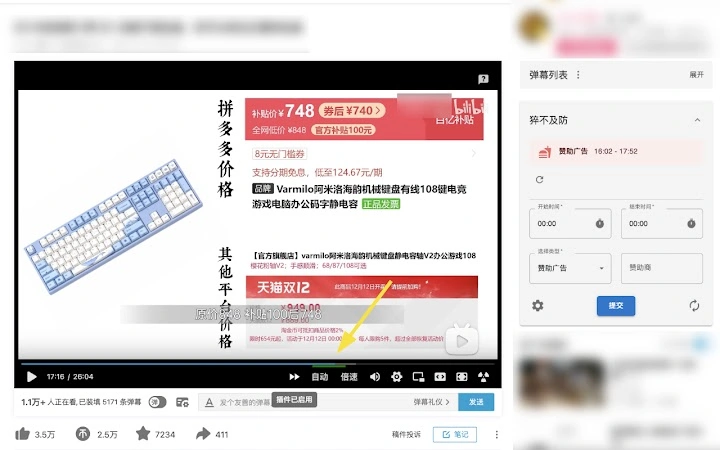
Description
Auto-Skip Bilibili Video Clips
Overview
The software is a browser extension designed to enhance the viewing experience on Bilibili, a popular Chinese video platform. It automatically activates a skip function for specific video segments, allowing users to bypass content they find disruptive or irrelevant. This includes promotional advertisements, fixed-length segments, and interactive prompts such as "like, share, subscribe" calls. The tool is particularly useful for users seeking uninterrupted video consumption, especially during long-form content or series.
Developed by 猝不及防, the extension leverages community-driven data to identify and flag skip-worthy segments. Users can contribute by submitting new clips through the "猝不及防" card displayed on the right side of the video page. This collaborative model ensures that the skip database evolves with user preferences and platform changes. The extension does not alter video content directly but works at the browser level to detect and skip predefined segments based on shared data.
Target users include frequent Bilibili viewers, content creators, and anyone who values efficient, distraction-free video playback. It is ideal for users watching educational videos, vlogs, or anime series where interruptions can disrupt immersion. The tool operates entirely within the browser environment, requiring no external installations or complex configurations.
Key Features & Capabilities
- Automatic Clip Skipping – The extension detects and skips predefined video segments such as sponsor ads, fixed-length interludes, and interactive prompts like "one-click three connections" without user intervention.
- Community-Driven Data – Users can view, vote on, and submit new skipable clips via the "猝不及防" card, ensuring the skip database remains up-to-date and reflects real user experiences.
- Customizable Skip Preferences – Users can adjust settings to enable or disable skipping for specific types of content, allowing personalized control over the viewing experience.
- Browser-Level Integration – The tool functions directly within supported browsers, requiring no additional software or system-level changes.
- Lightweight Design – With a file size of 1.2 MB, the extension is optimized for minimal impact on browser performance and loading times.
Real-world usage includes skipping promotional segments during a 45-minute tutorial video, avoiding repetitive "like and subscribe" calls in vlogs, or eliminating fixed interludes in anime episodes. These features collectively reduce viewer fatigue and improve content consumption efficiency. The extension’s reliance on user-submitted data ensures it adapts to evolving content formats on Bilibili.
User Interface, Workflow & Performance
The extension integrates seamlessly into the Bilibili video player interface, displaying the "猝不及防" card on the right side of the video. This card serves as the central hub for user interaction, enabling access to skip suggestions, voting, and submission of new clips. The UI is minimal and non-intrusive, designed to avoid disrupting the viewing experience.
Navigating the extension’s features is straightforward. Users can access settings through the browser’s extension menu to toggle skip functions for specific content types. The workflow is optimized for speed and simplicity, with minimal clicks required to adjust preferences. The extension activates automatically upon video load, ensuring immediate functionality without manual setup.
Performance details were not specified by the developer. However, given the lightweight nature of the extension (1.2 MB), it is expected to have minimal impact on browser resource usage. The developer did not provide additional system requirements or performance benchmarks. Stability during extended video playback sessions was not tested or reported.
Compatibility & System Requirements
The extension is compatible with Windows, Mac, and Linux operating systems. It is designed to work with major web browsers, though specific browser names were not listed. The software version is 1.0.0, and the installation size is 1.2 MB.
Exact system requirements were not listed. The developer did not specify minimum CPU, RAM, or storage thresholds. Compatibility information is limited to the supported operating systems. Users should ensure their browser supports extensions and has JavaScript enabled for full functionality.
Pros and Cons
Pros
- Automatically skips disruptive video segments on Bilibili
- Community-driven data ensures up-to-date skip rules
- Customizable skip preferences for personalized viewing
- Lightweight and fast-loading with only 1.2 MB size
- Free to use with no hidden costs
Cons
- Relies on user-submitted data, which may vary in accuracy
- Functionality limited to Bilibili platform only
- No official support for mobile browsers or apps
- Performance impact not independently verified
- Settings interface may be limited in advanced options
FAQ Section
Is the extension compatible with all browsers?
The extension is designed for use on web browsers supporting extensions, but specific browser compatibility was not confirmed by the developer.
Is the software safe to install?
As a browser extension from a known developer, it operates within the browser’s security sandbox. No external permissions were disclosed, but users should only install from trusted sources.
How often does the extension receive updates?
Update frequency was not specified. Users are encouraged to check for updates through their browser’s extension management page.
Does the extension require an internet connection?
Yes, the extension requires an active internet connection to fetch and submit skip data from the community database.
Can I use this tool offline?
Offline functionality is not supported. The extension relies on real-time data exchange with the backend server, so it cannot operate without an internet connection.
Final Thoughts
The Auto-Skip Bilibili Video Clips extension offers a practical solution for users seeking a smoother, interruption-free viewing experience on Bilibili. By leveraging community input to identify and skip unwanted segments, it delivers a personalized and efficient playback environment. Its lightweight design and free access make it accessible to a broad audience.
While its functionality is confined to a single platform and depends on user contributions, the tool effectively addresses common viewer frustrations. For frequent Bilibili users, especially those watching long-form or repetitive content, this extension is a valuable addition to their browser toolkit.
Download Auto-Skip Bilibili Video Clips now.
Guides & Tutorials for 猝不及防 (B站视频赞助广告跳过) Extension for Chrome
How to install 猝不及防 (B站视频赞助广告跳过) Extension for Chrome
- Click the Preview / Download button above.
- Once redirected, accept the terms and click Install.
- Wait for the 猝不及防 (B站视频赞助广告跳过) Extension for Chrome download to finish on your device.
How to use 猝不及防 (B站视频赞助广告跳过) Extension for Chrome
This software is primarily used for its core features described above. Open the app after installation to explore its capabilities.
User Reviews for 猝不及防 (B站视频赞助广告跳过) Extension for Chrome 0
No reviews found





